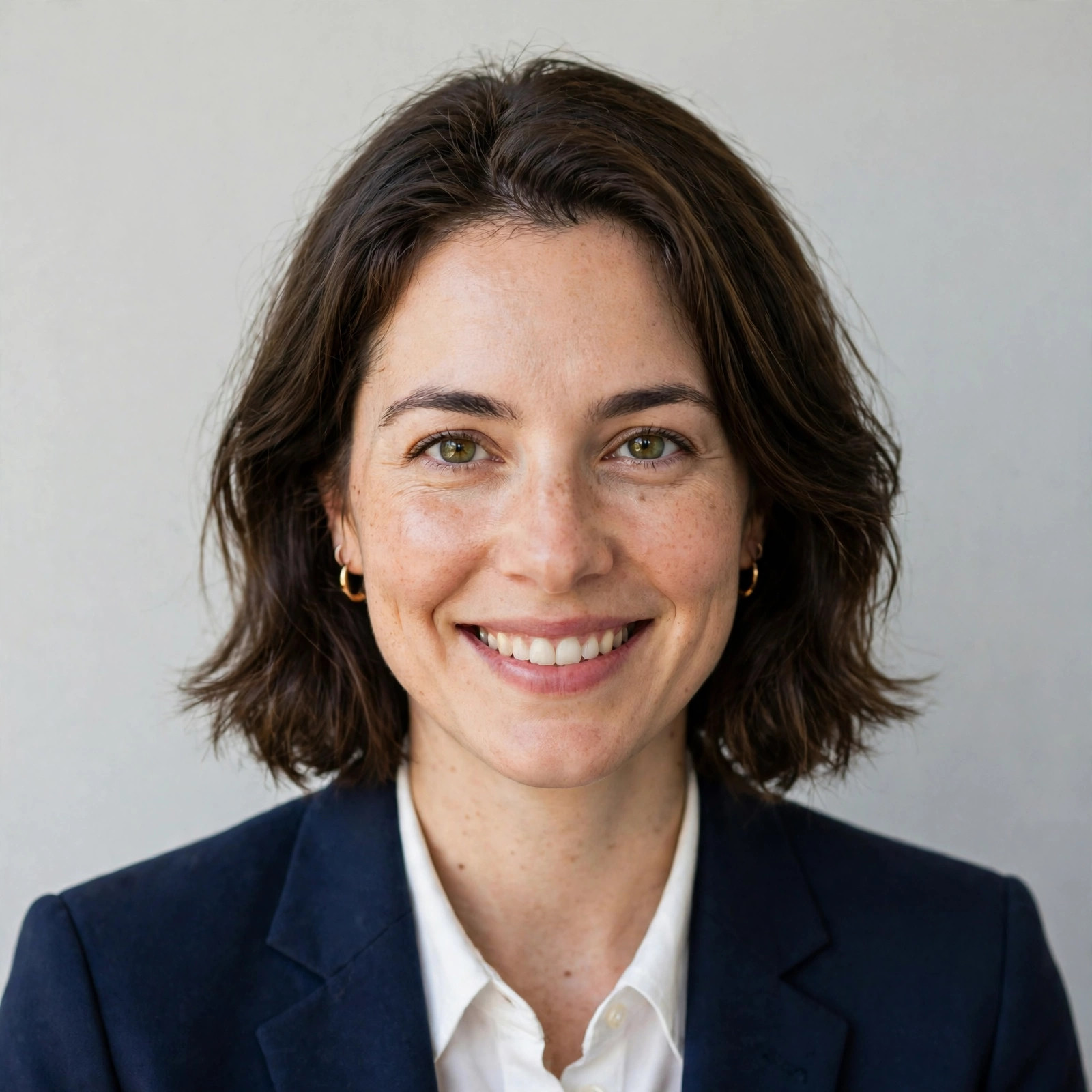
A good LinkedIn photo used to mean booking a studio and paying for a photographer. Today, a well-written AI headshot prompt can produce a clean, professional portrait in minutes. Recruiters, clients and collaborators judge you in the first two seconds of seeing your profile, so a sharp headshot is not vanity — it is part of how you present your work.
AI headshots work best when you treat them like a real photo shoot: decide who the person is, what they are wearing, where they are standing, and how the light falls. Vague prompts produce vague, plastic-looking faces. Specific prompts produce portraits that look like they were taken by a photographer. This guide gives you a simple formula, ten copy-ready prompts, and the fixes for the mistakes that make AI headshots look fake.
The headshot prompt formula
Every strong headshot prompt answers the same six questions, in order: who is in the photo, what are they wearing, where are they, how is the light, what camera shot is it, and what style should the result have? Leave one out and the generator guesses.
Person: age range, expression, and one or two defining features. Keep it simple: “a confident woman in her early 30s, warm slight smile, shoulder-length dark hair.”
Clothing: name the actual garment and its colour. “Navy blazer over a white shirt” beats “professional outfit” every time, because the model has something concrete to draw.
Background: a plain wall, an office, or a park. A simple background keeps attention on the face and makes the portrait usable as a profile photo.
Lighting: soft window light, studio softbox, or golden-hour sunlight. Light is what makes a portrait look real, so always name it. Our guide to photorealistic AI images explains why light direction matters more than any other single detail.
Camera: head-and-shoulders framing, 85mm portrait lens, shallow depth of field, eye-level angle.
Style: “photorealistic, natural skin texture, shot on a DSLR” anchors the result in photography. If you need a square crop for LinkedIn, plan the AI image aspect ratio before you generate — a 1:1 or 4:5 frame suits profile photos far better than a wide landscape shot.
10 ready-to-use AI headshot prompts
Copy a prompt, change the bracketed details, and generate three or four variations — then refine the best one.
1. Corporate LinkedIn classic
Professional corporate headshot of a [man in his late 20s], short neat hair, confident subtle smile, charcoal suit and white shirt, no tie, plain light grey studio background, soft diffused studio lighting, head-and-shoulders framing, 85mm portrait lens, photorealistic, natural skin texture
2. Corporate LinkedIn for women
Professional LinkedIn headshot of a [woman in her mid 30s], shoulder-length brown hair, warm approachable smile, navy blazer over a cream blouse, plain soft beige studio background, gentle window light from the left, head-and-shoulders composition, 85mm lens, photorealistic, realistic skin pores
3. Creative professional
Creative professional headshot of a [designer in her late 20s], relaxed genuine smile, black turtleneck, warm terracotta studio wall background, soft directional lighting, medium close-up, 50mm lens, photorealistic, editorial magazine portrait style
4. Casual startup founder
Relaxed startup founder headshot of a [man in his early 30s], light stubble, friendly open smile, dark green linen shirt with sleeves rolled up, bright modern office background softly blurred, natural daylight, head-and-shoulders framing, photorealistic, candid corporate photography
5. Outdoor natural light
Outdoor professional headshot of a [woman in her 40s], tied-back hair, calm confident expression, smart burgundy blazer, softly blurred green park background, golden hour sunlight on the face, head-and-shoulders framing, 85mm lens, photorealistic, natural skin texture
6. Studio grey background
Studio headshot of a [man in his 50s], grey-flecked hair and glasses, thoughtful slight smile, dark blue suit and light blue shirt, seamless medium grey studio backdrop, three-point studio lighting, tight head-and-shoulders crop, 85mm lens, photorealistic, executive portrait
7. Black and white portrait
Black and white professional headshot of a [woman in her late 20s], short curly hair, strong direct gaze with a soft smile, simple black blouse, plain dark grey background, soft side lighting, head-and-shoulders framing, 85mm lens, fine film grain, timeless editorial portrait
8. Friendly consultant
Friendly consultant headshot of a [man in his 30s], neat beard, warm engaging smile, light grey blazer over a white t-shirt, bright minimal office background softly blurred, soft even daylight, medium close-up, photorealistic, approachable business portrait
9. Academic or researcher
Academic headshot of a [woman in her 40s], glasses, hair in a low bun, composed confident expression, dark jacket over a patterned blouse, softly blurred library bookshelves behind, warm indoor lighting, head-and-shoulders framing, photorealistic, university faculty portrait
10. Team headshot consistency
For a whole team, keep one prompt fixed and change only the person:
Team headshot series, consistent style: professional headshot of a [team member description], [clothing in the company palette], plain warm white studio background, soft even studio lighting, head-and-shoulders framing, 85mm lens, same crop and colour grading for all portraits, photorealistic, natural skin texture
Backgrounds and clothing that work
The background should be boring. That is the point. A plain light grey, beige or soft white wall makes your face the subject and keeps the photo readable at the tiny size LinkedIn shows in comments. Blurred offices and parks work too, but only when the blur is strong — if the background is sharp enough to read, it competes with your face. Avoid busy patterns and bright colours behind your head.
Clothing is the fastest way to set the tone. A suit and tie says corporate and formal; a blazer over a plain shirt says professional but approachable; a smart casual shirt says startup and creative. Solid colours photograph far better than patterns. Choose one outfit per prompt and describe it exactly, including the colour. See our AI portrait prompts guide for more on pose, expression, clothing and light.
Mistakes that make AI headshots look fake — and how to fix them
Plastic skin. Prompts that say “flawless skin” or “perfect skin” produce a waxy, airbrushed face with no pores. Fix it by writing “natural skin texture, visible pores, realistic skin detail” and removing the word “flawless” entirely.
Over-smoothing. Generators often smooth the face and sharpen the eyes at the same time, which looks like a filter. Add “subtle retouching, natural detail, no beauty filter” to the prompt.
Wrong ears and collars. Headshots usually crop hands out, which is one reason they are easier than full portraits. But ears, hairlines and shirt collars still go wrong. If an ear looks melted or a collar floats, simplify the prompt — fewer details near the edges means fewer chances to fail.
Mismatched light. The face is lit from the left while the background suggests light from the right. Name one light source and its direction in every prompt, such as “soft window light from the left”, and keep the background light consistent with it.
Too-perfect symmetry. Perfectly even eyes and a toothpaste-advert smile read as artificial. Ask for a “slight, natural smile” or a “closed-lip smile” instead of a broad grin, and avoid prompts that demand symmetry.
Wrong framing. A headshot that crops the top of the head looks accidental. Always write the framing in the prompt — “head-and-shoulders, head centred, small space above the head” — and generate in a square or portrait ratio so the crop works on LinkedIn without cutting the chin.
A short note on ethics
An AI headshot should look like you on a good day, not like a different person. Do not use a portrait that changes your age or features so much that people would not recognise you in a video call — that is misrepresentation, and it damages trust the moment you meet someone in person. Use your own face as the reference image when the tool supports it, and follow your employer’s rules: some companies require AI-generated images to be disclosed. LinkedIn allows AI-assisted photos, but honesty about them is good practice, especially in hiring or media, where your identity is part of your credibility.
Quick checklist before you publish
- Does the face look like you? Check the eyes, smile and hairline against a real photo.
- Is the skin natural, with visible texture rather than a plastic finish?
- Is the light consistent between the face and the background?
- Is the framing head-and-shoulders, with the head centred and nothing cropped awkwardly?
- Does the clothing match the industry you work in?
- Is the background simple and not distracting at thumbnail size?
- Have you checked the ears, collar and hair edges at full size?
- Would someone who meets you on a video call still recognise you?
If the answer to any of these is no, change one thing in the prompt and regenerate. Fix one variable at a time.